Gradebook Class List Back to School
Back-to-school season isn’t just about new notebooks and sharpened pencils—it’s about setting up systems that actually work. For teachers juggling lesson planning, parent communication, behavior tracking, and grading, a clean, flexible, and visually cohesive gradebook class list can be the quiet foundation that holds everything else together. The Gradebook Class List Back to School is designed for that exact moment: when you need structure without rigidity, simplicity without sacrifice, and creativity without clutter.
A Thoughtful Tool Built for Real Classrooms
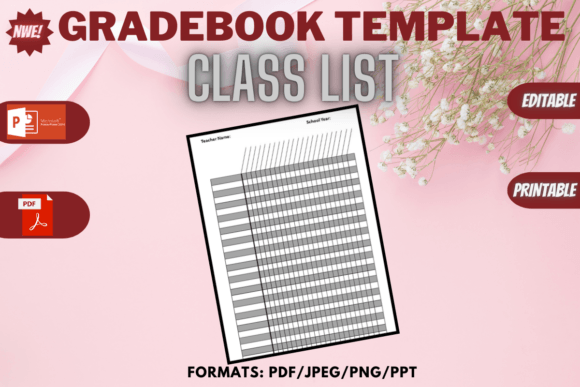
This isn’t another generic spreadsheet or one-size-fits-all PDF. The Gradebook Class List Back to School is a printable editable template crafted with intention—30 student slots (a realistic capacity for most K–12 homerooms and subject-specific classes), compact 6 x 9 inch dimensions (fits neatly in binders, desk trays, or laminated on clipboards), and delivered in multiple formats: PDF (print-ready), JPEG and PNG (for digital annotation or display), and PPT (ideal for projecting during roll call or quick visual updates).
All files come bundled in a single ZIP folder—no hunting through emails or cloud links. You unzip once, open what you need, and start customizing immediately. No subscriptions. No logins. No watermarks.
Why Format Flexibility Matters More Than You Think
Teachers wear many hats—and use many tools. That’s why having the same gradebook in four distinct formats changes how—and where—you use it.
- PDF: Best for printing, handwriting grades, or filling in digitally using Adobe Acrobat or free alternatives like Preview (Mac) or Xodo (Windows/iOS/Android). Ideal for teachers who prefer tactile input or need offline access during fire drills, field trips, or tech-outage days.
- JPEG & PNG: Perfect for inserting into digital lesson plans, embedding in LMS announcements (like Canvas or Google Classroom), or layering over classroom photos for visual attendance tracking. PNG adds transparency—useful if you’re designing custom bulletin board graphics or overlaying names onto seating charts.
- PPT: Enables live editing during class—think highlighting students who’ve completed warm-ups, color-coding participation levels, or animating transitions between sections. Also handy for sharing anonymized examples during PLC meetings or mentoring new staff.
Beyond the Gradebook: Unexpected Uses Across Roles
While built for educators, the Gradebook Class List Back to School resonates with professionals far beyond the classroom:
- Coaches & Youth Program Leaders: Track attendance, skill benchmarks, or team assignments across seasonal sessions—no need to rebuild from scratch each term.
- Freelance Trainers & Workshop Facilitators: Use the clean layout to manage client progress, note follow-up actions, or personalize certificates of completion.
- Homeschool Co-ops & Microschool Founders: Maintain consistency across rotating instructors while preserving family privacy (e.g., omitting last names or using ID codes).
- Small Business Owners Running Classes: From pottery studios to coding bootcamps—this template helps manage enrollment caps, material prep lists, and feedback collection without bloating your CRM.
Design That Supports, Not Distracts
The layout avoids visual overload. There’s no forced cursive font or excessive clipart—but also no sterile grid. Subtle lines, balanced white space, and clear column headers (Name, Date, Assignment, Grade, Notes) create breathing room for both writing and scanning. It’s professional enough for admin walkthroughs, warm enough for student-facing displays, and neutral enough to match any classroom theme—from minimalist Scandinavian to vibrant rainbow accents.
Because it’s editable, you control the tone: rename “Notes” to “Growth Observations,” swap “Assignment” for “Skill Focus,” or add a small icon column for behavior prompts (✅ / ⚠️ / 🌟). That kind of adaptability means the tool grows with your pedagogy—not the other way around.
Practical Tips Before You Print or Project
Before downloading or sharing the Gradebook Class List Back to School, consider these real-world checks:
- Test print at actual size: Some printers default to “fit to page.” Set scaling to 100% or “actual size” to preserve the 6 x 9 inch proportions—especially important if you plan to laminate or insert into pre-punched binder sleeves.
- Check your annotation workflow: If you’ll edit digitally, confirm your PDF reader supports text entry and saving changes. Not all do—Adobe Acrobat Reader DC, Foxit PDF Editor, and Apple Preview handle this reliably.
- Think ahead about privacy: While the template doesn’t collect sensitive data, avoid storing full student IDs or birthdates in shared cloud folders. Use local storage or password-protected ZIPs for sensitive versions.
- Pair it with your existing system: This isn’t meant to replace your district’s SIS or gradebook software. Instead, use it as a lightweight companion—for quick formative checks, substitute teacher handouts, or analog backups when Wi-Fi drops mid-class.
When Simplicity Becomes Strategic
In education—and in many knowledge-based professions—tools don’t have to be complex to be powerful. The Gradebook Class List Back to School works because it respects your time, honors your judgment, and stays out of the way until you need it. It doesn’t assume your teaching style, your tech access, or your school’s policies. It gives you a starting point—not a script.
That’s especially valuable in August, when energy is high but bandwidth is thin. When you’re choosing between five different “back-to-school bundles” online, look for the one that answers practical questions: Can I use this tomorrow? Will it still work in November? Does it let me focus on students—not formatting?
If you’ve ever spent 20 minutes adjusting column widths in Excel just to fit 28 names on one page—or printed a gradebook only to realize the margins clipped half the names—the Gradebook Class List Back to School isn’t just convenient. It’s relief, refined.